How to Build a Conversational Interface for Spotify Ads with Claude Code Plugins
Introduction
Managing advertising campaigns on Spotify traditionally requires navigating complex API calls and reading through dense technical documentation. But a new approach using Claude Code Plugins transforms this experience into a natural, conversational interface. By combining an OpenAPI specification and Markdown files, developers can create an intuitive ad management tool without writing a single line of compiled code. This article explores how this method works and why it matters for marketers and developers alike.
What Is an OpenAPI Specification?
An OpenAPI Specification (formerly Swagger) is a standard format for describing RESTful APIs. It defines endpoints, request parameters, response formats, and authentication methods in a machine-readable document. For the Spotify Ads API, this spec acts as a blueprint, enabling tools like Claude Code Plugins to understand exactly how to interact with the API. Instead of manually coding each request, you can feed the spec directly into the plugin, which then generates the necessary calls on the fly.
Leveraging Markdown Documentation
Alongside the OpenAPI spec, Markdown files provide human-readable context. These can include usage examples, best practices, error handling tips, and campaign optimisation strategies. When combined with the API spec, Claude Code Plugins can interpret both the technical structure and the practical guidance, resulting in a richer conversational experience. For instance, a user could ask "Create a new ad campaign targeting Gen Z listeners in the UK" and the plugin would consult the Markdown for targeting guidelines and the OpenAPI spec for the correct endpoint.
How Claude Code Plugins Enable Conversational Interfaces
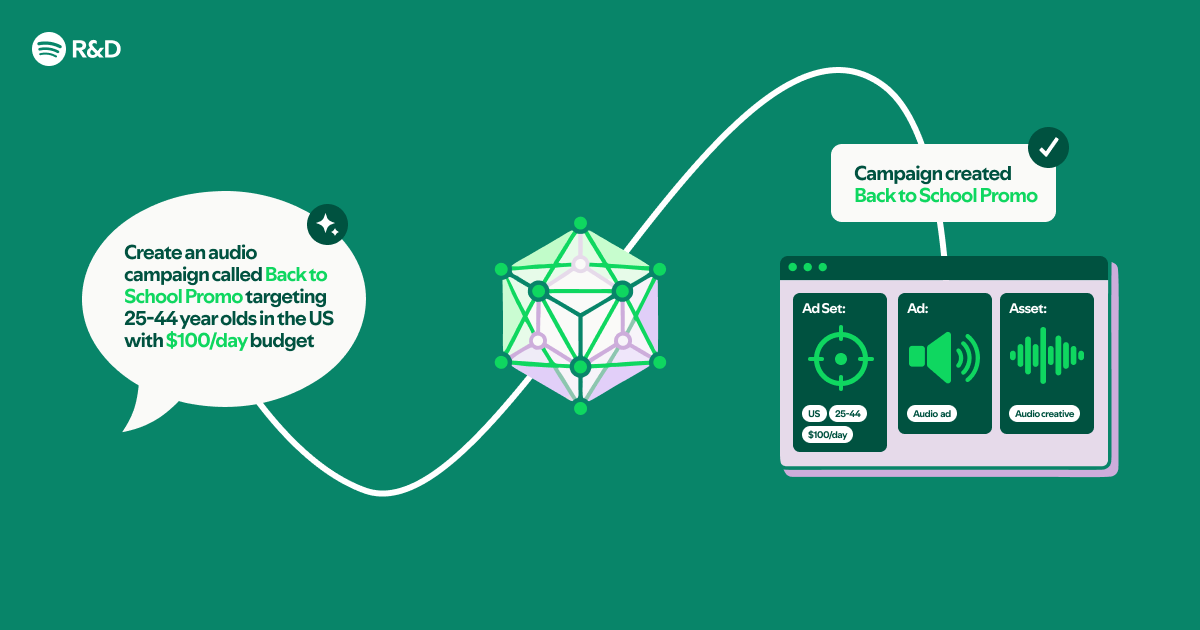
Claude Code Plugins are designed to extend the capabilities of AI assistants like Claude. By loading custom plugins, developers can teach Claude to interact with external systems. In this case, a plugin is built that references the Spotify Ads API via its OpenAPI spec and Markdown docs. When a user types a natural language request, the plugin:
- Parses the intent – e.g., "show me last month's ad performance"
- Matches it to an API operation – e.g., GET /ads/performance
- Generates the correct request – including authentication and parameters
- Returns a human-friendly response – formatted from the API response
This entire pipeline requires no compiled code – no C++, Java, or even Python scripts. The plugin configuration is declarative, making it accessible to developers who may not be experts in the Spotify Ads API.
Why This Matters for Ad Management
The traditional workflow for managing Spotify ads involves learning the API, writing integration code, and maintaining it as the API evolves. With a natural language interface:
- Ease of use: Marketers can query campaign data or launch new ads using everyday language.
- Rapid prototyping: Developers can test API interactions without building a full front-end.
- Reduced maintenance: When the API changes, you only update the OpenAPI spec and Markdown; the plugin logic remains the same.
- Increased adoption: Small teams with limited engineering resources can leverage the full power of Spotify's ads platform.
Moreover, because Claude Code Plugins operate within a chat environment (like Slack, Discord, or a web UI), the ad management tool becomes part of the team's daily workflow.

The Magic of Declarative Configuration
The key innovation is that no compiled code is required. Instead of writing a custom application with its own build process, testing suite, and deployment pipeline, you simply:
- Obtain the OpenAPI spec for the Spotify Ads API
- Write (or reuse) Markdown documentation with usage guidelines
- Create a Claude Code Plugin configuration that points to these files
That configuration tells Claude how to translate natural language into API calls. This approach dramatically lowers the barrier to building conversational tools, especially for complex APIs like Spotify Ads. It also aligns with the industry trend toward API-first development and low-code/no-code solutions.
Example Conversation with the Plugin
Imagine a marketing manager types: "I want to see the cost-per-click of my summer campaign." The Claude Code Plugin would:
- Recognise the need for a report on a specific campaign
- Look up the campaign ID from context or ask for it
- Call the relevant endpoint (
/campaigns/{id}/insights) - Format the response: "Your summer campaign has an average CPC of $0.45 over the last 30 days."
If the user then says, "Double the budget for that campaign", the plugin would execute an update call. All without the user ever seeing a raw API request or response.
Conclusion
Building a natural language interface to the Spotify Ads API using Claude Code Plugins is a powerful example of how AI and declarative configuration can simplify ad management. By reusing existing OpenAPI specs and Markdown documentation, developers create a tool that is both flexible and easy to maintain. There is no need for compiled code, making this solution ideal for fast-moving teams. As conversational interfaces become more common, this approach could become the standard for interacting with advertising platforms.
This article was inspired by original content from Spotify Engineering.
Related Articles
- IDE Choice Emerges as Critical AI Quality Variable, Experts Warn
- Python 3.15 Alpha 6 Drops: JIT Compiler Gets Major Speed Boost, New Profiler Unveiled
- Securing .NET AI Agents: How the Agent Governance Toolkit Enforces Policy on MCP Tool Calls
- 10 Key Insights into Kubernetes v1.36’s Unbreakable Admission Policies
- How to Experience Alan Turing's Legacy Through 'Breaking the Code' at Cambridge's Central Square Theater
- New Interactive Quiz Challenges Python Developers to Master AI-Assisted Coding with OpenCode
- AI Coding Agents Take Center Stage: JetBrains × Codex Hackathon Winners Revealed
- Mastering AI-Assisted Development: The SPDD Method